
Anúncios
Measuring land accurately has never been easier thanks to modern mobile technology and GPS-powered applications designed specifically for this purpose.


Gone are the days when professionals and landowners relied solely on traditional surveying equipment and complex mathematical calculations. Today’s land measurement apps combine satellite positioning, advanced algorithms, and intuitive interfaces to deliver precise results in seconds. Whether you’re a farmer planning crop rotations, a real estate agent valuing properties, or a construction manager preparing site estimates, these digital tools have transformed how we interact with geographic spaces.
Anúncios
This article explores the features, benefits, and practical applications of land measurement apps, helping you understand why millions of users worldwide have adopted this technology for their professional and personal projects. From basic area calculations to advanced mapping capabilities, discover how a simple smartphone app can replace expensive equipment while delivering professional-grade accuracy. 📱
Understanding Land Measurement Technology
Modern land measurement applications leverage Global Positioning System (GPS) technology to determine exact coordinates and calculate distances with remarkable precision. When you walk around a property’s perimeter with your smartphone, the app continuously records GPS coordinates, creating a digital boundary that represents the physical space you’ve covered.
Anúncios
The accuracy of these measurements depends on several factors, including GPS signal strength, atmospheric conditions, and the quality of your device’s receiver. Most contemporary smartphones can achieve accuracy within 3-5 meters under normal conditions, which is sufficient for the majority of practical applications. Professional-grade devices with enhanced GPS capabilities can narrow this margin even further.
What makes these apps particularly impressive is their ability to process complex geometric calculations instantly. They can handle irregular shapes, calculate areas in multiple units (acres, hectares, square feet, square meters), and even measure distances, perimeters, and elevation changes—all without requiring specialized mathematical knowledge from the user.
Key Features That Make Measurement Apps Essential 🔑
The best land measurement applications offer a comprehensive suite of features designed to accommodate various professional needs and skill levels. These tools have evolved far beyond simple area calculations to become complete surveying solutions.
GPS-Based Perimeter Tracking
The core functionality allows users to walk or drive around a property while the app automatically records their path. This creates an accurate digital representation of the land boundaries. Most apps offer options to manually adjust points if obstacles prevent physical access to certain areas or if corrections are needed.
Multiple Measurement Units
Professional users work with different measurement standards depending on their location and industry. Quality apps provide instant conversion between acres, hectares, square meters, square feet, square yards, and other regional units. This flexibility eliminates the need for manual conversions and reduces potential errors.
Distance and Perimeter Calculations
Beyond area measurements, these apps calculate the total perimeter of marked properties and individual distances between specific points. This feature proves invaluable for fencing projects, irrigation planning, or determining property boundaries with precision.
Map Integration and Satellite Imagery
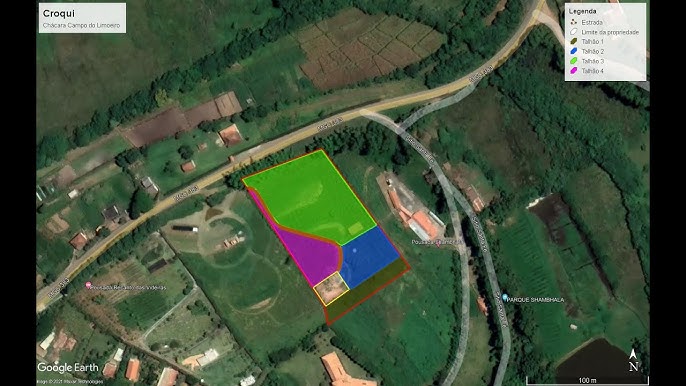
Integration with mapping services like Google Maps provides visual context for measurements. Users can view their marked areas overlaid on satellite imagery, street maps, or terrain views. This visualization helps verify accuracy and provides useful reference points for documentation and presentations.
Data Export and Sharing Capabilities
Professional workflows require proper documentation. Modern measurement apps allow users to export their data in various formats including PDF reports, KML files for Google Earth, shapefiles for GIS software, and image files with overlaid measurements. Sharing options enable quick collaboration with clients, colleagues, or contractors.
Offline Functionality
Many land measurement scenarios occur in rural areas with limited or no internet connectivity. The best apps function completely offline, storing map data locally and synchronizing measurements when connection is restored. This ensures uninterrupted workflow regardless of location.
Practical Applications Across Industries 🌾
The versatility of land measurement apps has made them indispensable tools across numerous professional sectors. Their accessibility and accuracy have democratized surveying capabilities that were once reserved for specialists with expensive equipment.
Agriculture and Farming
Farmers use these apps daily for crop planning, irrigation design, fertilizer calculation, and yield estimation. Knowing exact field dimensions helps optimize resource allocation, reducing waste and improving profitability. Livestock managers measure pasture areas to calculate appropriate stocking rates and rotation schedules.
Real Estate and Property Development
Real estate professionals utilize measurement apps for quick property assessments during site visits. Accurate land area data influences property valuations, helps identify development potential, and provides clients with reliable information. Developers use these measurements for preliminary feasibility studies before investing in professional surveys.
Construction and Engineering
Construction managers measure job sites to estimate material quantities, plan equipment placement, and track project progress. Civil engineers use these apps for preliminary site assessments, earthwork calculations, and as-built verification. The ability to quickly measure irregular terrain helps with grading and drainage planning.
Landscaping and Garden Design
Landscape architects and garden designers measure properties to create accurate design proposals. These measurements inform material estimates for hardscaping, irrigation requirements, and planting plans. Even homeowners planning their own garden projects benefit from precise measurements for purchasing the right quantities of soil, mulch, or paving materials.
Environmental Conservation
Conservationists and environmental researchers use measurement apps to document habitat areas, track deforestation or restoration progress, and monitor protected zones. The ability to quickly measure and map areas in remote locations makes field research more efficient and comprehensive.
How to Use a Land Measurement App Effectively 📍
Getting accurate results from a land measurement app requires understanding best practices and avoiding common pitfalls. While these tools are designed for simplicity, following proper techniques ensures reliable data.
Preparing for Measurement
Before beginning, ensure your device has a clear view of the sky to receive strong GPS signals. Buildings, dense tree cover, and adverse weather can interfere with accuracy. Check that your device’s location services are enabled and set to high accuracy mode. If measuring a large area, verify that your device is fully charged or bring a portable power bank.
Walking the Perimeter
Start at a clearly identifiable corner or boundary marker. Walk steadily along the property boundary at a consistent pace—rushing reduces accuracy. Hold your device steadily at waist height for optimal GPS reception. For large properties, driving slowly along the perimeter works equally well, though walking generally provides more precise results for smaller areas.
Marking Corners and Key Points
Most apps allow manual point placement by tapping the screen. Use this feature to mark exact corners, especially when obstacles prevent you from walking the complete perimeter. You can also edit points after completing the circuit to refine boundaries and correct any GPS drift.
Verifying Your Measurements
After completing a measurement, review the marked area on the map overlay. Check that the boundary follows expected property lines and doesn’t include unintended sections. Compare your results with known dimensions if available, or perform a second measurement to verify consistency. Professional-grade work may warrant multiple measurements averaged for increased reliability.
Choosing the Right Land Measurement App 🎯
The app marketplace offers numerous options for land measurement, each with different features, interfaces, and pricing models. Selecting the right one depends on your specific needs, technical comfort level, and frequency of use.
Essential Features to Consider
Look for apps with intuitive interfaces that don’t require extensive training. GPS accuracy indicators help you know when conditions are optimal for measurement. Multi-unit support ensures flexibility for different projects. Check whether the app functions offline if you work in areas with poor connectivity. Export capabilities are crucial if you need to share or archive measurements professionally.
Free vs. Premium Options
Many excellent measurement apps offer free versions with basic functionality suitable for occasional use. Premium versions typically remove advertisements, increase the number of saved measurements, add advanced features like contour mapping or coordinate system support, and provide enhanced export options. Evaluate whether the additional features justify the cost based on your usage frequency and professional requirements.
User Reviews and Ratings
Before committing to an app, review feedback from actual users in your industry. Pay attention to comments about GPS accuracy, customer support responsiveness, and software stability. Apps with regular updates demonstrate ongoing developer commitment to improvement and compatibility with new device models.
Advantages Over Traditional Surveying Methods 💡
While professional surveying equipment remains necessary for legal boundary determinations and highly precise work, land measurement apps offer compelling advantages for everyday applications.
Cost Efficiency
Professional surveying services can cost hundreds or thousands of dollars depending on property size and complexity. A smartphone app—often free or costing less than a meal—provides sufficient accuracy for most practical purposes. This democratizes access to measurement capabilities for small businesses, farmers, and individuals who couldn’t justify professional surveying costs.
Immediate Results
Traditional surveys require scheduling, site visits, data processing, and report preparation—a process that can take days or weeks. Measurement apps provide instant results that can inform immediate decisions. This speed proves invaluable when time-sensitive opportunities or problems arise.
Accessibility and Convenience
Your smartphone is always with you, turning every site visit into an opportunity for measurement. No need to transport specialized equipment, learn complex surveying techniques, or coordinate with external professionals for preliminary assessments. This convenience encourages more frequent measurement, leading to better-informed decisions.
Visual Documentation
The combination of measurements with satellite imagery creates compelling visual documentation that’s easy for non-technical stakeholders to understand. These visuals enhance presentations, reports, and communication with clients or colleagues who may struggle with abstract numerical data.
Limitations and When to Call a Professional Surveyor 📐
Despite their impressive capabilities, land measurement apps have limitations that users must understand to avoid inappropriate applications or unrealistic expectations.
Legal and Regulatory Considerations
App-based measurements generally aren’t legally recognized for property transactions, boundary disputes, or official documentation. Legal property transfers require certified surveys conducted by licensed professionals using calibrated equipment and following regulated procedures. Always consult local regulations before relying on app measurements for official purposes.
Accuracy Constraints
Consumer GPS receivers in smartphones have inherent accuracy limitations, typically 3-10 meters depending on conditions. While sufficient for agricultural planning or rough estimates, this margin of error is unacceptable for projects requiring millimeter precision. Professional surveying equipment using differential GPS or total station technology delivers sub-centimeter accuracy when required.
Terrain and Environmental Challenges
GPS signals can be blocked or distorted by tall buildings, dense forests, canyons, or atmospheric conditions. Properties with significant elevation changes or complex topography may challenge app accuracy. In these situations, professional surveyors use additional techniques like laser ranging and leveling instruments to compensate for GPS limitations.
Maximizing Accuracy: Tips and Techniques ✅
While you can’t change your device’s hardware limitations, several techniques help you extract maximum accuracy from land measurement apps.
Optimal GPS Conditions
Measure during clear weather when possible, as heavy cloud cover and precipitation can degrade GPS signals. Early morning or late afternoon often provide better satellite geometry than midday. Avoid measuring immediately after activating your device’s GPS—allow 2-3 minutes for the receiver to acquire strong satellite locks.
Calibration and Settings
Some apps offer calibration features that improve accuracy by learning your device’s specific GPS characteristics. Explore your app’s settings for accuracy enhancement options. Ensure your device’s operating system is updated, as manufacturers regularly release GPS performance improvements.
Measurement Techniques
For irregular boundaries, place more waypoints to better represent the actual shape. When possible, verify measurements against known distances—if your property includes a straight fence line of known length, check whether the app measurement matches. Consider measuring the same area multiple times and averaging the results for improved reliability.
The Future of Land Measurement Technology 🚀
Technological advancement continues to enhance the capabilities and accessibility of land measurement tools. Understanding emerging trends helps you anticipate future possibilities and plan long-term investments.
Enhanced GPS and Positioning Systems
Next-generation smartphones will incorporate multi-frequency GPS receivers that simultaneously access multiple satellite constellations (GPS, GLONASS, Galileo, BeiDou). This dramatically improves accuracy and reliability, especially in challenging environments. Some manufacturers are already implementing these technologies in flagship devices.
Augmented Reality Integration
Emerging apps experiment with augmented reality overlays that display measurements directly on your camera view of the property. This intuitive visualization helps users better understand spatial relationships and verify that virtual boundaries match physical features.
Artificial Intelligence and Machine Learning
AI algorithms can analyze measurement patterns to identify and correct GPS errors, improving accuracy beyond hardware limitations. Machine learning models trained on satellite imagery can automatically detect property boundaries, potentially requiring users only to verify rather than manually trace perimeters.
Integration with Drone Technology
Some advanced measurement platforms now integrate with consumer drones, combining aerial photography with GPS data to create detailed 3D property models. This convergence provides volumetric calculations for earthwork projects and comprehensive visual documentation previously requiring specialized photogrammetry services.
Making Land Measurement Part of Your Workflow 🔄
Successfully incorporating measurement apps into professional practice requires more than just downloading software—it demands thoughtful integration into existing workflows and processes.
Start by identifying specific use cases where app measurements add value without replacing necessary professional services. Train team members on proper measurement techniques and accuracy expectations. Establish protocols for data management, including naming conventions, backup procedures, and archive systems. Document which types of projects require professional surveys versus app-based preliminary assessments.
Consider creating templates for common measurement scenarios that standardize how data is collected and reported. This consistency improves efficiency and ensures reliable results across different team members and projects. Regular review of measurement history can reveal patterns and inform process improvements.
Empowering Better Land Management Decisions 🌍
The true value of land measurement apps extends beyond their technical capabilities to the improved decision-making they enable. When accurate spatial data becomes instantly accessible, property owners and professionals can respond more intelligently to opportunities and challenges.
Farmers optimize input applications and maximize yields. Real estate professionals provide clients with better information and faster service. Construction managers reduce material waste and prevent costly errors. Environmental stewards document and protect critical habitats more effectively. Even homeowners gain confidence in their property projects through reliable measurements.
This democratization of surveying technology represents a significant shift in how we interact with land and space. What once required specialized knowledge and expensive equipment now sits in your pocket, ready to deliver professional-grade results whenever needed. The barrier between question and answer has collapsed, replaced by immediate access to the spatial intelligence that drives informed choices.
As these technologies continue advancing, their accuracy will improve, their capabilities will expand, and their adoption will grow. The fundamental transformation, however, has already occurred—reliable land measurement has become universally accessible, empowering millions to better understand, manage, and optimize the spaces that shape our world. Whether you’re managing vast agricultural holdings or planning a backyard garden, these powerful tools stand ready to turn spatial questions into actionable answers with unprecedented ease and accuracy.
