
Anúncios
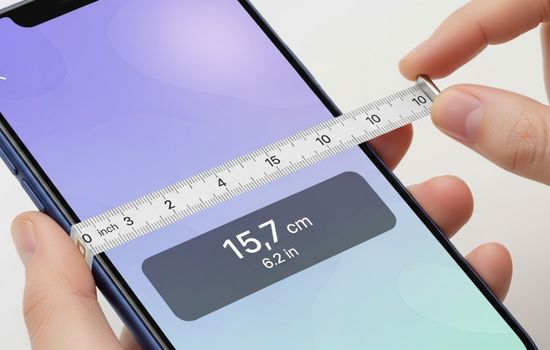
Measuring spaces accurately has never been easier thanks to mobile apps that turn your smartphone into a digital tape measure, offering precision and convenience right in your pocket.

Gone are the days when you needed to carry bulky measuring tools for every little task around the house or workspace. Modern technology has transformed our smartphones into multipurpose devices capable of performing functions we never imagined possible. Digital measuring apps leverage augmented reality (AR), camera sensors, and advanced algorithms to deliver surprisingly accurate measurements.
Anúncios
Whether you’re a professional contractor, interior designer, DIY enthusiast, or simply someone who occasionally needs to measure furniture before buying, these applications offer incredible versatility. They eliminate the need for physical tape measures while providing additional features like area calculation, unit conversion, and measurement history that traditional tools simply cannot match.
📱 How Digital Tape Measure Apps Actually Work
Understanding the technology behind these applications helps you appreciate their capabilities and limitations. Most modern measuring apps rely on augmented reality technology combined with your phone’s camera and motion sensors. When you point your camera at an object, the app uses AR frameworks like ARKit (iOS) or ARCore (Android) to map the three-dimensional space around you.
Anúncios
The process involves detecting surfaces and planes within your environment. Your phone’s gyroscope, accelerometer, and camera work together to track movement and calculate distances based on perspective changes. Some apps also utilize LiDAR sensors found in newer iPhone models, which dramatically improve accuracy by emitting laser pulses to measure exact distances.
The software then overlays virtual measuring lines onto your real-world view through the screen, allowing you to mark points and calculate distances between them. While not always as precise as professional laser measuring tools, these apps achieve remarkable accuracy for everyday tasks, typically within 1-3% margin of error under good lighting conditions.
🏆 Top Features to Look for in Measuring Apps
When choosing the right digital tape measure application for your needs, certain features distinguish excellent apps from mediocre ones. Understanding what to prioritize helps ensure you select the tool that best fits your measurement requirements.
Measurement Versatility
The best apps offer multiple measurement modes beyond simple point-to-point distance calculation. Look for applications that can measure height, width, area, perimeter, and even volume. Some advanced apps include angle measurement, which proves invaluable for construction and carpentry projects.
Unit Flexibility and Conversion
Seamless switching between metric and imperial units is essential, especially if you work with international specifications or prefer different measurement systems for various tasks. Quality apps provide instant conversion without requiring manual calculations.
Photo and Annotation Capabilities
Being able to capture measurements directly on photos creates permanent records of your work. This feature becomes particularly useful when planning renovations, shopping for furniture, or communicating specifications to others. Annotation tools that let you add notes, arrows, and labels enhance documentation quality.
Measurement History and Project Organization
Apps that save your measurement history and allow project-based organization help you stay efficient. Imagine measuring an entire room and being able to reference those dimensions weeks later without repeating the process.


🔧 Practical Applications for Different User Types
Digital measuring apps serve diverse audiences, each finding unique value in mobile measurement technology. Understanding how different professionals and hobbyists use these tools reveals their true versatility.
Home Improvement Enthusiasts
DIY homeowners find digital tape measures invaluable when planning projects. Before purchasing furniture, you can quickly verify whether that new sofa will fit through doorways and into your living room. When hanging pictures or shelves, these apps help ensure perfect spacing and alignment without complicated calculations.
Gardening projects benefit too—measuring garden bed dimensions, spacing between plants, or determining how much fencing material you need becomes straightforward. The ability to save measurements means you can shop confidently with exact specifications in hand.
Real Estate Professionals
Agents and property managers use measuring apps during property showings and inspections. Quickly providing room dimensions to interested buyers without scheduling separate measurement appointments saves time and accelerates the sales process. Creating floor plan sketches with accurate measurements becomes possible even without professional surveying equipment.
Interior Designers and Decorators
Professionals in the design industry appreciate the speed and convenience of mobile measuring tools. During initial client consultations, they can capture complete room dimensions, ceiling heights, and window measurements within minutes. This data integrates smoothly into design software for space planning and visualization.
Construction and Trade Professionals
While contractors typically use dedicated laser measuring devices for critical measurements, digital tape measure apps serve as excellent backup tools or quick-reference solutions. They’re perfect for preliminary estimates, verifying dimensions, or situations where carrying additional equipment isn’t practical.
✨ Maximizing Accuracy with Mobile Measuring Tools
Achieving the best possible accuracy from your digital tape measure app requires understanding optimal usage techniques. Several factors influence measurement precision, and knowing how to control them dramatically improves results.
Lighting Conditions Matter
Good lighting is fundamental to AR-based measurement accuracy. Your phone’s camera needs clear visibility of surfaces and edges to detect planes correctly. Avoid measuring in dim environments or direct harsh sunlight that creates strong shadows. Consistent, diffused lighting produces the most reliable results.
Surface and Texture Considerations
Apps perform best on surfaces with visible texture and detail. Completely blank, featureless walls or highly reflective surfaces like mirrors and polished metal can confuse AR tracking systems. When measuring such surfaces, try to include reference points with texture in your camera view.
Calibration and Device Positioning
Many apps include calibration procedures to optimize accuracy for your specific device. Taking time to complete these calibrations pays dividends in measurement precision. When measuring, hold your phone steady and move smoothly between points rather than making jerky movements that can throw off tracking algorithms.
Verify Critical Measurements
For projects where precision is crucial, always verify digital measurements with a physical tape measure or professional tools. Use mobile apps for initial measurements, estimates, and non-critical dimensions, but confirm important specifications before making irreversible decisions like cutting expensive materials.
💡 Creative Uses Beyond Basic Measuring
Innovative users discover unexpected applications for digital measuring tools that extend far beyond simple length and width measurements. These creative uses demonstrate the flexibility and problem-solving potential of mobile measurement technology.
Travel and Luggage Planning
When traveling, especially with airlines that have strict baggage size restrictions, measuring apps help verify your luggage meets requirements before heading to the airport. You can also measure hotel room dimensions when booking accommodations for events requiring specific space configurations.
Moving and Storage Solutions
Planning a move becomes significantly easier when you can measure furniture and compare those dimensions against doorways, stairwells, and hallways in your new home. Storage unit shopping also benefits from accurate measurements that help you select appropriately sized spaces without wasting money on excess capacity.
Sports and Recreation
Athletes and coaches use measuring apps to mark field dimensions, verify court layouts, or track training distances. Parents setting up backyard play areas measure safe spacing for equipment installation. Outdoor enthusiasts estimate hiking distances and elevation changes using measurement tools combined with maps.
Educational Applications
Teachers incorporate measuring apps into geometry and mathematics lessons, providing hands-on experience with spatial relationships and measurement concepts. Students engage more actively when learning involves interactive technology they can directly manipulate and experiment with.
🎯 Comparing Free Versus Premium Features
Most digital tape measure applications follow freemium business models, offering basic functionality at no cost while reserving advanced features for paid subscribers. Understanding what you get at each level helps you make informed decisions about whether premium upgrades justify their cost.
Free Version Capabilities
Standard free versions typically provide essential measuring functions including point-to-point distance measurement, basic area calculation, and unit conversion. You’ll usually encounter advertisements and may face limitations on saving measurements or exporting data. For occasional users with simple needs, free versions often suffice.
Premium Upgrade Benefits
Paid subscriptions generally remove advertising and unlock advanced features like unlimited measurement storage, detailed project organization, cloud synchronization across devices, and priority customer support. Some apps include specialized tools like floor plan creation, 3D room scanning, and integration with design software exclusively in premium tiers.
Professional users who rely on these tools daily usually find premium subscriptions worthwhile due to enhanced productivity and expanded capabilities. Casual users should evaluate whether they’ll actually utilize advanced features before committing to recurring payments.
🔒 Privacy and Data Security Considerations
When using camera-based applications that capture images of your environment, understanding privacy implications becomes important. Responsible app developers implement security measures to protect your data, but users should remain informed about what information these applications collect and how it’s used.
Most measuring apps require camera access to function, which is necessary for AR functionality. However, reputable applications process images locally on your device rather than uploading them to remote servers. Check app permissions and privacy policies to ensure your photos and measurements remain private.
If an app offers cloud storage for measurements and photos, verify that data transmission uses encryption and that you control who can access your stored information. Be cautious about sharing measurement photos on social media, as they might inadvertently reveal details about your home layout or valuable possessions.
🚀 Future Developments in Mobile Measurement Technology
The evolution of smartphone hardware and software continues accelerating, promising even more impressive measurement capabilities in coming years. Understanding emerging trends helps you anticipate what next-generation measuring apps might offer.
Enhanced Sensor Integration
As LiDAR sensors become standard in more smartphone models rather than remaining exclusive to premium devices, measurement accuracy will improve significantly across all price points. These laser-based sensors provide millimeter-level precision that rivals professional tools.
Artificial Intelligence Improvements
Machine learning algorithms are getting better at recognizing objects and automatically suggesting relevant measurements. Future apps might automatically measure entire rooms with minimal user input, intelligently identifying furniture, doors, windows, and architectural features.
Augmented Reality Advancements
AR frameworks continue evolving with better surface detection, improved tracking stability, and more realistic virtual object placement. These improvements translate directly to more accurate and reliable measurements, even in challenging environments.
Integration with Smart Home Ecosystems
Imagine measuring apps that integrate with smart home systems, automatically suggesting optimal furniture placement based on room dimensions and traffic patterns, or coordinating with robotic vacuum cleaners that have already mapped your floor plan.
📚 Tips for First-Time Users
If you’re new to digital measuring apps, a few practical tips help you get started successfully and avoid common beginner frustrations that might discourage continued use.
Start by measuring familiar objects whose dimensions you already know, like standard doors (typically 80 inches tall) or letter-size paper (8.5 by 11 inches). This practice helps you develop technique while verifying your app’s accuracy. Move slowly and deliberately when establishing measurement points, giving the AR system time to lock onto surfaces correctly.
Practice in different lighting conditions and on various surface types to understand when your app performs best and where its limitations lie. Don’t get discouraged by initial imprecise results—like any skill, effective use of these tools improves with experience.
Explore all available features rather than limiting yourself to basic distance measurement. Experiment with area calculation, angle measurement, and photo annotation to discover the full range of capabilities your chosen app offers.
🌟 Making the Most of Your Digital Measuring Experience
Successfully integrating mobile measuring apps into your workflow or daily life requires more than just downloading and occasionally opening the application. Developing consistent habits and understanding best practices transforms these tools from novelties into genuinely useful utilities.
Create a systematic approach to measuring projects by establishing a routine. When measuring rooms, for example, always proceed in the same order—perhaps starting with overall dimensions, then measuring individual walls, followed by windows, doors, and architectural features. This consistency ensures you don’t miss important measurements and makes reviewing your data more intuitive.
Take advantage of organizational features by creating separate projects for different areas or purposes. Label measurements clearly and add contextual notes while details are fresh in your mind. A measurement marked simply “width” becomes meaningless weeks later, but “living room width – north wall between doorway and window” remains useful indefinitely.
Combine your measuring app with other mobile tools for enhanced functionality. Pair measurements with sketching apps to create annotated diagrams, or use note-taking applications to maintain comprehensive project documentation that links measurements with photos, material lists, and planning notes.
🎨 Overcoming Common Challenges and Limitations
Even the best measuring apps face certain limitations inherent to their technology. Recognizing these challenges and knowing how to work around them prevents frustration and helps you achieve better results.
When measuring very large distances outdoors, AR tracking can become less accurate due to lack of nearby reference points. In these situations, break long measurements into smaller segments, measuring each section individually and adding them together for total distance.
Highly reflective or transparent surfaces pose problems for camera-based measurement systems. When measuring glass, mirrors, or polished metal, try adjusting your angle to reduce glare, or place temporary markers like painter’s tape at measurement points to give the app visible targets.
If you consistently experience tracking issues, your phone’s sensors may need recalibration. Some devices include sensor calibration utilities in settings menus. Additionally, restarting your phone occasionally can resolve temporary sensor glitches affecting measurement accuracy.
Battery consumption can become significant during extended measuring sessions, especially when using AR features that keep your screen bright and camera active. For lengthy projects, consider bringing a portable charger or planning measurement work when you have access to power outlets.
🛠️ Complementing Physical Tools Rather Than Replacing Them
Digital measuring apps represent powerful additions to your toolkit, but recognizing when traditional tools remain superior demonstrates practical wisdom. The most effective approach combines digital and physical measuring methods, leveraging each one’s strengths.
For rough estimates, quick checks, and situations where convenience trumps absolute precision, mobile apps excel. They’re perfect when you don’t have physical tools available or when carrying equipment would be impractical. Use them for preliminary measurements that inform planning and decision-making.
Critical measurements requiring guaranteed accuracy—cutting expensive materials, verifying building code compliance, or professional contracting work—still demand traditional tape measures, laser distance meters, or professional surveying equipment. Think of mobile apps as supplementary tools that enhance rather than replace your existing measurement capabilities.
This balanced perspective helps you avoid disappointment from unrealistic expectations while fully appreciating the genuine value these applications provide. They’re not perfect replacements for every measuring scenario, but they offer remarkable convenience and functionality for countless everyday situations.
🌍 Accessibility and Universal Design Benefits
Digital measuring tools offer significant accessibility advantages for people who find traditional tape measures difficult to use. Individuals with limited mobility, visual impairments when combined with audio feedback features, or dexterity challenges that make handling physical measuring tapes problematic can find mobile apps more manageable.
The visual interface with large, clear numbers and the ability to save measurements without writing them down manually reduces physical demands. Voice control integration in some apps further enhances accessibility, allowing hands-free operation for users who need it.
For elderly users who might struggle with reading tiny markings on traditional tape measures, smartphone screens displaying large, high-contrast numbers provide easier visibility. The elimination of manual note-taking also reduces opportunities for transcription errors that can occur when transferring measurements to paper.
These accessibility benefits extend measuring capabilities to broader populations, democratizing access to tools that support independence in home maintenance, creative projects, and daily problem-solving tasks.
💭 Final Thoughts on Digital Measurement Revolution
The transformation of smartphones into capable measuring instruments represents another example of how mobile technology continues expanding device functionality beyond original design intentions. What began as communication tools now serve as cameras, navigation systems, fitness trackers, and increasingly accurate measuring devices.
As sensor technology improves and software algorithms become more sophisticated, the gap between mobile measuring apps and dedicated professional tools continues narrowing. While they may never completely replace specialized equipment in all contexts, their convenience, accessibility, and constantly improving accuracy make them invaluable for countless everyday applications.
Whether you’re a professional seeking efficient preliminary measurement tools, a homeowner tackling DIY projects, or simply someone who appreciates having versatile problem-solving capabilities in your pocket, digital tape measure apps deserve consideration. They exemplify how thoughtful application of technology can genuinely improve daily life by making previously specialized capabilities universally accessible.
The next time you need to measure something, before searching for a physical tape measure, consider reaching for your phone instead. You might be pleasantly surprised by how well these digital alternatives perform, and how quickly they become your preferred measuring method for many situations. The future of measurement is already in your pocket—it’s time to unlock its potential.
