
Anúncios
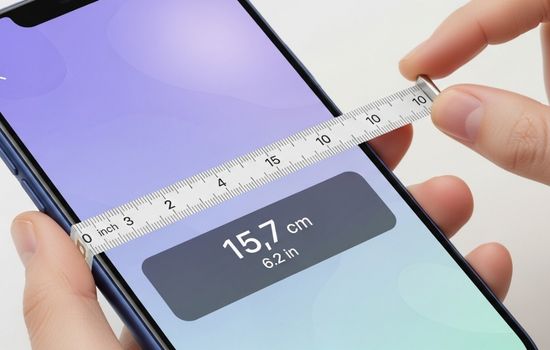
Measuring distances, objects, and spaces has never been easier thanks to smartphone technology and specialized measuring tape apps available today.

Anúncios
Whether you’re a professional contractor, interior designer, DIY enthusiast, or simply someone who occasionally needs to measure furniture or room dimensions, having a digital measuring tool right in your pocket can be incredibly convenient. These innovative apps leverage your phone’s camera, sensors, and augmented reality capabilities to transform your device into a powerful measuring instrument.
Gone are the days when you had to carry a bulky tape measure everywhere or struggle with inaccurate estimations. Modern measuring tape apps offer impressive accuracy, user-friendly interfaces, and features that traditional tools simply cannot match. Let’s explore the world of mobile measuring applications and discover how they can simplify your daily tasks.
📱 How Digital Measuring Tape Apps Actually Work
Anúncios
The technology behind smartphone measuring apps is fascinating and relies primarily on augmented reality (AR) and sophisticated algorithms. When you point your phone’s camera at an object or space, the app uses AR technology to detect surfaces, edges, and dimensions in real-time.
Most modern smartphones come equipped with depth sensors, accelerometers, and gyroscopes that work together to calculate distances accurately. The app processes visual information from your camera and combines it with sensor data to determine the size and dimensions of objects within the frame.
Apple devices utilize ARKit technology, while Android phones leverage ARCore to provide these measuring capabilities. These platforms enable developers to create apps that can understand three-dimensional space through your phone’s camera, making measurements possible without any physical contact with the object being measured.
🎯 Top Features to Look for in Measuring Apps
Not all measuring tape applications are created equal. When choosing the right app for your needs, consider these essential features that separate exceptional tools from mediocre ones:
- AR-based measurements: Augmented reality integration provides the most accurate results and intuitive user experience
- Multiple measurement units: Flexibility to switch between metric and imperial systems (centimeters, meters, inches, feet)
- Screenshot and save options: Ability to capture and store measurements with photos for future reference
- Room scanning capabilities: Advanced features that allow you to measure entire rooms and create floor plans
- Object height detection: Automatic recognition and measurement of vertical distances
- Angle measurements: Tools to calculate angles for construction or design projects
- Export and sharing functions: Easy ways to send measurements to colleagues or clients via email or messaging apps
🏆 Best Applications for Using a Measuring Tape on Your Phone
The app marketplace offers numerous options for digital measuring tools. Here are some of the most reliable and feature-rich applications available for both iOS and Android devices:
CamToPlan – Comprehensive AR Measuring Solution
CamToPlan stands out as one of the most versatile measuring apps available today. This powerful tool combines augmented reality technology with user-friendly design to deliver professional-grade measurements directly from your smartphone.
The app excels at creating detailed floor plans, measuring room dimensions, and calculating areas with impressive accuracy. Whether you’re planning a renovation, arranging furniture, or working on a construction project, CamToPlan provides all the essential tools you need in one convenient package.
Key features include automatic room detection, 3D floor plan creation, measurement history saving, and the ability to add notes and annotations to your measurements. The free version offers substantial functionality, while the premium version unlocks advanced features for professional users.
Digital Tape Measure – Simple and Effective
For users who prefer straightforward functionality without overwhelming features, Digital Tape Measure apps provide essential measuring capabilities in a clean, intuitive interface. These applications focus on doing one thing exceptionally well: providing accurate distance measurements quickly and easily.
Most digital tape measure apps allow you to measure objects by simply pointing your camera at them and tapping two points on the screen. The app instantly calculates the distance between those points and displays the measurement in your preferred unit.


Measure by Apple – Built-in iOS Excellence
iPhone and iPad users have access to Apple’s native Measure app, which comes pre-installed on devices running iOS 12 or later. This application leverages Apple’s advanced ARKit technology to deliver remarkably accurate measurements without requiring any additional downloads.
The Measure app automatically detects rectangular objects and can measure their dimensions with a single tap. It also includes a level tool for ensuring surfaces are perfectly horizontal or vertical, making it invaluable for hanging pictures, installing shelves, or checking construction work.
Ruler App – Multiple Measurement Tools in One
Ruler apps typically combine several measurement functionalities into a single application. Beyond AR-based distance measuring, these apps often include an on-screen ruler that uses your device’s screen as an actual measuring tool for smaller objects.
Additional features commonly found in ruler apps include protractors for angle measurements, bubble levels, and conversion calculators. This all-in-one approach makes them perfect for users who need various measurement tools for different situations.
💡 Practical Applications for Mobile Measuring Tools
Understanding where and how to use these apps can maximize their value in your daily life. Here are some scenarios where smartphone measuring tools prove incredibly useful:
Home Improvement and Renovation Projects
Planning a kitchen remodel or bathroom upgrade? Measuring tape apps help you accurately measure existing spaces, doorways, and wall dimensions before purchasing new appliances, cabinets, or fixtures. You can share these measurements directly with contractors or use them while shopping for materials.
Furniture Shopping and Interior Design
Before buying that perfect sofa or dining table, use your measuring app to ensure it will fit in your space. Measure doorways, hallways, and the intended placement area to avoid the disappointment of purchasing furniture that doesn’t fit through your door or overwhelms your room.
Real Estate and Property Management
Real estate professionals can quickly measure rooms, create floor plans, and calculate square footage during property viewings. This capability allows for faster listing creation and provides potential buyers with accurate space information.
DIY Projects and Crafts
From building bookshelves to creating custom picture frames, DIY enthusiasts benefit tremendously from having instant measuring capabilities. Quick measurements help you cut materials accurately and ensure your projects come together perfectly.
Professional Construction and Contracting
While professional laser measuring tools remain essential for critical construction work, smartphone apps provide convenient backup measurements, quick estimates, and preliminary site assessments. They’re particularly useful for initial client consultations and project planning.
📏 Tips for Getting the Most Accurate Measurements
To ensure your smartphone measurements are as precise as possible, follow these expert recommendations:
Ensure proper lighting: AR measuring apps require good lighting conditions to accurately detect surfaces and edges. Natural daylight or bright indoor lighting produces the best results. Avoid measuring in dim conditions or with harsh shadows that might confuse the app’s sensors.
Calibrate your device: Some apps require initial calibration to optimize accuracy. Follow the app’s calibration instructions carefully, which typically involve moving your phone in specific patterns to help it understand spatial dimensions.
Keep your camera lens clean: Smudges, fingerprints, and dirt on your camera lens can significantly affect measurement accuracy. Wipe your lens with a soft cloth before taking measurements.
Maintain steady hands: Shaky movements can lead to inaccurate readings. Hold your phone steady when taking measurements, or better yet, rest your arms against a stable surface for maximum stability.
Measure from multiple angles: For critical measurements, take readings from different positions and angles, then compare the results. This practice helps identify any anomalies and increases overall confidence in your measurements.
Start with the reference surface: Most AR measuring apps require you to identify a flat reference surface before measuring. Move your phone slowly across the area to help the app detect the ground or floor plane accurately.
🔄 Comparing Digital Apps vs. Traditional Tape Measures
While smartphone measuring apps offer incredible convenience, understanding their strengths and limitations compared to traditional tools helps you choose the right tool for each situation.
| Feature | Digital Apps | Traditional Tape Measure |
|---|---|---|
| Portability | Always with you on your phone | Requires carrying separate tool |
| Accuracy | Very good (±1-2% margin) | Excellent (±0.1% margin) |
| Ease of Use | Simple point-and-tap interface | Requires physical manipulation |
| Range | Excellent for long distances | Limited by tape length |
| Battery Requirement | Depends on phone battery | No power needed |
| Additional Features | Photos, saving, sharing, floor plans | Basic measuring only |
| Cost | Free to low cost | Low to moderate cost |
🚀 Advanced Features Worth Exploring
Premium versions of measuring apps often include sophisticated capabilities that extend far beyond basic distance measurements. These advanced features cater to professional users and serious DIY enthusiasts who need comprehensive measurement solutions.
3D Room Scanning and Modeling
High-end measuring apps can create detailed three-dimensional models of entire rooms or spaces. By slowly panning your camera around a room, the app captures all dimensions, creating a digital twin that you can view from any angle, add virtual furniture to, or export for use in design software.
Automatic Object Recognition
Some intelligent measuring apps can automatically identify common objects like doors, windows, tables, and chairs, measuring them without requiring manual point selection. This feature dramatically speeds up the measuring process when documenting multiple items.
Cloud Integration and Project Management
Professional-grade apps often include cloud storage integration, allowing you to organize measurements into projects, collaborate with team members, and access your data across multiple devices. This functionality transforms your measuring app into a comprehensive project management tool.
🔐 Privacy and Data Security Considerations
When using measuring apps that access your camera and store photos of your home or workplace, privacy becomes an important consideration. Reputable apps clearly explain their data usage policies and provide options to control how your information is stored and shared.
Review the app’s permissions carefully before installation. Most measuring apps only require camera access to function, but some may request additional permissions for cloud storage, location services, or photo library access. Grant only the permissions necessary for the features you intend to use.
Consider using apps from established developers with transparent privacy policies. Read user reviews to identify any privacy concerns reported by other users. For sensitive or confidential measurements, choose apps that offer local storage options rather than mandatory cloud uploads.
🌟 Making the Switch to Digital Measurements
Transitioning from traditional measuring tools to smartphone apps requires a brief learning curve, but the benefits quickly become apparent. Start by using your measuring app for non-critical projects where absolute precision isn’t essential, gradually building confidence in the technology.
Keep your physical tape measure handy during the initial transition period. Use both tools side-by-side to verify measurements and develop trust in your app’s accuracy. Most users find that after a week or two of regular use, their smartphone measuring app becomes their go-to tool for the majority of measuring tasks.
Experiment with different apps to find the one that best matches your workflow and needs. Many excellent measuring apps offer free versions with sufficient functionality for casual users, while professionals might benefit from investing in premium versions with advanced features.
✨ The Future of Mobile Measuring Technology
As smartphone hardware continues to advance, measuring apps will become even more accurate and feature-rich. Emerging technologies like LiDAR sensors, which Apple has already integrated into recent iPhone models, promise millimeter-level accuracy that rivals professional measuring equipment.
Artificial intelligence and machine learning will enable apps to better understand context, automatically identify measurement-relevant objects, and provide intelligent suggestions based on your measuring patterns. Integration with smart home systems, virtual reality platforms, and professional CAD software will expand the practical applications of mobile measuring tools.
The convergence of augmented reality, improved sensors, and sophisticated software means that your smartphone is quickly becoming a professional-grade measuring instrument capable of replacing multiple specialized tools. For many users, the question is no longer whether to use measuring apps, but rather which app best serves their specific needs.
🎓 Getting Started with Your First Measuring App
Ready to experience the convenience of digital measuring? Download one of the recommended apps from the links provided earlier in this article and start with simple measurements around your home. Measure door frames, furniture dimensions, or room sizes to familiarize yourself with the interface and capabilities.
Practice the proper technique: ensure good lighting, move your phone slowly during surface detection, and hold steady when marking measurement points. Compare your digital measurements with those from a traditional tape measure to build confidence in the accuracy.
As you become more comfortable with the basics, explore additional features like saving measurements, creating floor plans, or using the angle measurement tools. Most apps include built-in tutorials or help sections that explain advanced features and best practices.
The convenience, versatility, and growing accuracy of smartphone measuring applications make them invaluable tools for anyone who regularly needs to measure distances, objects, or spaces. Whether you’re a homeowner, professional tradesperson, or creative designer, these apps offer a perfect blend of accessibility and functionality that traditional measuring tools simply cannot match. 📐
